Release · June 17, 2026
Never miss a reply: visitors now get notified the moment you respond
A small fix with a big impact, and it's live on every plan.
Until now, there was a quiet gap in the conversation: you'd reply to a visitor, but if they'd already clicked away from the chat or scrolled on, they had no idea. Your message just sat there. Plenty of conversations went cold for no reason other than the visitor not knowing you'd answered.
Now, the moment you reply, the chat button shows a red notification badge with the number of unread replies, plus a soft notification sound — a clear signal to come back and continue. The badge clears as soon as they open the chat.
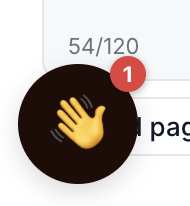
A few nice touches:
- It follows them around your site. If your reply arrives while they're moving between pages, the badge is still waiting when the next page loads — so your answer never gets lost.
- The sound is polite, not pushy. Browsers only allow sound after a visitor has interacted with the page, so if a reply lands before that, the badge still shows — we just skip the sound quietly.
- No setup needed. It's on automatically for every widget, on every plan. Nothing to switch on.
Small change, fewer dropped conversations. The replies you're already sending now actually get seen.
Already using OhhChats? A quick heads-up
There's nothing to set up or reinstall — reply notifications turn on automatically for your existing widget. If you don't see the badge straight away on your live site, your browser may be showing a saved (cached) copy of the older widget. First try a hard refresh to load the latest version — press Cmd + Shift + R on Mac, or Ctrl + Shift + R on Windows. If that doesn't do it, clear your cache manually: open your browser menu (usually the ⋮ or ⋯ icon in the top-right corner) → History → Clear browsing data, tick Cached images and files, clear it, then reload the page.